Microsoft Windows API C++ applications Part 1
This article demonstrates the main aspects involved to building Windows applications with MVS using the Windows API.
Windows Data types
Both Windows API and MFC (Microsoft Foundation Classes) derived applications make use of Windows data types, which map to C++ types. Some (not all) are tabulated below:
| Windows data type | Description |
|---|---|
| BOOL or BOOLEAN | A boolean that can be either TRUE or FALSE (uppercase, contrast to true and false in C++) |
| BYTE | An 8-bit byte |
| CHAR | An 8-bit character |
| DWORD | A 32-bit unsigned integer, equivalent to unsigned long in C++ |
| HANDLE | A 32-bit integer value that records the location of an object |
| HBRUSH | A handle to a brush (a brush fills an area with colour) |
| HCURSOR | A handle to a cursor |
| HDC | A handle to a device context (an object that outputs data to a screen or printer) |
| HINSTANCE | A handle to an instance (running application) |
| LPARAM | A message parameter |
| LPCSTR | A pointer to a constant null-terminated string of 8-bit ANSI characters |
| LPCWSTR | A pointer to a constant null-terminated string of 16-bit Unicode characters |
| LPHANDLE | A pointer to a handle |
| LRESULT | A signed value that results from processing a message (a message represents an application event) |
| WORD | A 16-bit unisgned integer, equivalent to an unsigned short in C++ |
All above types are contained the header file windows.h.
Hungarian notation
Before the days of strict type-checking at compile-time, programmers would attempt to resolve type misuse by prefixing variable names with letters to indicate their type. This Hungarian notation is largely not required anymore with modern C++ compilers that check for valid type handling. The notation is however still prevalent in Windows application code.
| Prefix | Variable type/intention |
|---|---|
| b | BOOL, equivalent to int |
| by | unsigned char; a byte |
| c | char |
| dw | DWORD; an unsigned long |
| fn | a function |
| h | a handle |
| i | int |
| l | long |
| lp | long pointer |
| n | int |
| p | a pointer |
| s | a string |
| sz, str | a zero terminated string |
| w | WORD; unsigned short |
| x, y | short, usually used for coordinates |
| cx, cy | short, c standing for count, used to denote lengths |
Hungarian notation also sets out naming conventions for functions and classes.
Under the Hungarian notation, functions start with capitalised letters, however, underscores are not permitted. Variable names use camel-case. Types and constants are fully capitalised and can include an underscores. Classes always start with uppercase C.
Windows applications
Windows recognises and calls two functions in a C++ project:
WinMain()- where execution begins and ends (equivalent to command linemain())WindowProc()- Windows message handling with the application
WinMain()
The function has the prototype (note the Hungarian notation applied):
int WINAPI WinMain(
	HINSTANCE hInstance,
	HINSTANCE hPrevInstance,
	LPSTR lpCmdLine,
	int nCmdShow
)
The parameters:
hInstance- a unique handle (32-bit integer) for the instancehPrevInstance- for 16-bit applications, a handle to the previous instance of the application; this is always NULL for 32-bit applicationslpCmdLine- a pointer to a command line instruction that ran the applicationnCmdShow- the display mode of the application e.g. normal, minimised, maxmised.
The function returns an instance of WINAPI, which is required for all C++ applications on Windows.
Win32 message boxes
Starting a new Win32 project (not console) with entry point WinMain():
// exclude MFC overhead, pure Win32
#define WIN32_LEAN_AND_MEAN

#include <windows.h>
#include <windowsx.h> // additional macros

int WINAPI WinMain(HINSTANCE hInstance,
				   HINSTANCE hPrevInstance,
				   LPSTR lpCmdLine,
				   int nCmdShow)
{
	MessageBox(
		NULL,  // handle of owner window (null if parent)

		// this project is configured to support Unicode
		// so the L macro which passes a Unicode wide char is required
		L"Message box title",
		L"Message box message",

		// logical OR producing buttons for both
		MB_OK | MB_ICONEXCLAMATION);

	return 0;
}
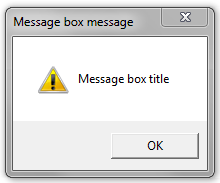
On compilation, this produces a dialog box:
Sidenote: targetting Windows 9X or NT
The passing of string literals with wide Unicode chars (instead of narrower ANSI chars) is achieved with the L macro. The above MessageBox() expects LPCWSTR instead of LPCSTR. This will be commonplace for all examples in this section (compiled applications targetting Windows NT derived operating systems). See also here.
If applications need to run on Win 9X, which has very limited support for Unicode, then one will need to compile with Multi-byte character set found under the project settings in MVS 2005 (this normally defaults to Unicode set):
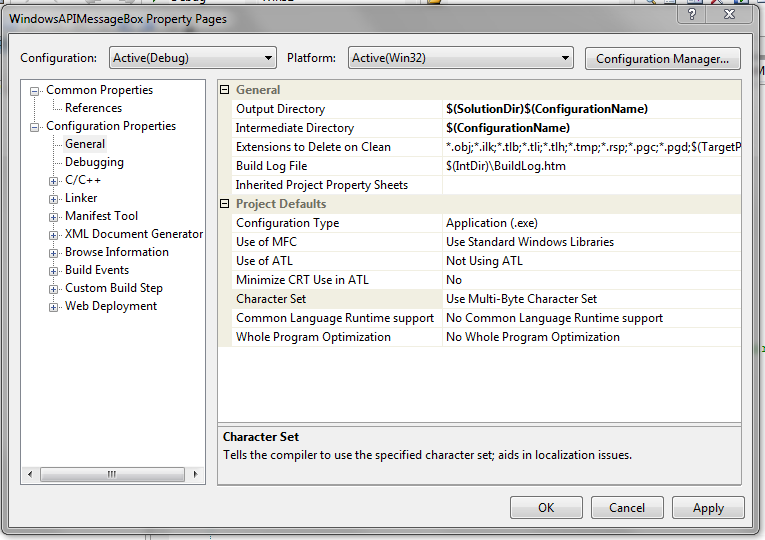
In such cases, it is not necessary to prefix strings with the L macro.
Window classes with WNDCLASSEX
The C/C++ structure WNDCLASSEX defines what sort of window to create. The naming CLASS is not a C++ class, but an MFC class, a representation of a window. Historically, WNDCLASSEX succeeds (implements additional parameters) an older (obsolete) structure, WNDCLASS.
The procedure generally involves:
- Defining a Window class and attaching an event handler (callback)
- Registering the Window class with Windows
- Creating a new Window and getting a reference to it
- Showing the window
- Define the callback function that fires when an event occurs
1. Defining WNDCLASSEX and attaching a handler
An instance of WNDCLASSEX is constructed in WinMain() (the full cpp file is given at the end of this section), and so have access to its parameters.
The fields to focus on for now are commented:
struct WNDCLASSEX {
	UINT cbSize;
	UINT style;
	WNDPROC lpfnWndProc;
	int cbClsExtra; // seldom used
	int cbWndExtra; // seldom used
	HINSTANCE hInstance;
	HICON hIcon;
	HCURSOR hCursor;
	HBRUSH hbrBackground;
	LPCTSTR lpszMenuName;
	LPCTSTR lpszClassName;
	HICON hIconSm;
}

// construct an instance of WNDCLASSEX:
WNDCLASSEX windowClass;

//initialise specific fields

// size of the structure object (useful for calling function
// to know ahead of time how much data is expected)
windowClass.cbSize = sizeof(WNDCLASSEX);

// determine behaviour; in this case when the window should
// be redrawn (in this case, when both the horizontal
// and vertical dimensions have changed);
// the bitwise OR is applied as both options (flags) have null, true or
// false states (in this case as 32-bit words, with 1 for true)
// so here windowClass.style would be 1 when there was a change
// to either or both dimensions, and 0 at all other times
windowClass.style = CS_HREDRAW | CS_VREDRAW;

// set a pointer to a (callback) function (i.e. WindowProc)
//  that fires when an event occurs
// WindowProc() is defined later
windowClass.lpfnWndProc = WindowProc;

// pass WinMain's hInstance as the current instance's value
windowClass.hInstance = hInstance;

// the following window elements (icon, cursor and brush)
// can be set to null, after which
// Windows will apply defaults (standard UI elements); the following
// explicit calls are equivalent to null passed
windowClass.hIcon = LoadIcon(0, IDI_APPLICATION);
windowClass.hCursor = LoadCursor(0, IDC_ARROW);
windowClass.hbrBackground = static_cast<HBRUSH>(GetStockObject(GREY_BRUSH));

// set the name that identifies this classification of window
static char szAppName[] = L"someName";  // the L prefix is not a typo (Unicode)
windowClass.lpszClassName = szAppname;
The last field denotes the name Windows uses to refer to this Window class.
2. Registering WNDCLASSEX object with Windows
The Windows API function RegisterClassEx() can be used to register the WNDCLASSEX object (or registering the window classification) with Windows. Historically, the function RegisterClass() can be used to register objects of the older WNDCLASS strcuture.
RegisterClassEx($nameOfWindowClassInstance);
3. Getting a reference to the window created
The Windows API function CreateWindow() can be called after window registration and return a reference to the window. The reference can be useful later. Note this does not mean the window is drawn or shown yet.
HWND hWndAlpha;

//...

hWndAlpha = CreateWindow(
	szAppname, // allows Windows to find the registered window
	L"The Window title goes here",  // the L prefix is not a typo
	WS_OVERLAPPEDWINDOW, // this defines what sort of window components to show
	CW_USEDEFAULT, // the next four are about window size and position
	CW_USEDEFAULT,
	CW_USEDEFAULT,
	CW_USEDEFAULT,
	0, // 0 = this is a parent window (no handle)
	0, // 0 = no menu required
	hInstance, // this would come from WinMain for this application
	0 // 0 = simple window layout (single document inteface SDI);
	  // multi-document interface (MDI) discussed later
);
There is another similar function CreateWindowEx() that is similar to CreateWindow(). The former includes an extra parameter dwExStyle for advanced window features, and is generally null. Hence, we use CreateWindow() here.
4. Showing the window
The Windows API function ShowWindow() can then be used to draw the window to the screen.
// note aforementioned parameters, the reference to
// the created window and WinMain's nCmdShow
ShowWindow(hWndAlpha, nCmdShow);
This method is however not necessary if the third parameter to CreateWindow() is set with WS_VISIBLE:
hWndAlpha = CreateWindow(
	szAppname,
	L"The Window title goes here",
	WS_OVERLAPPEDWINDOW | WS_VISIBLE, // this shows that window on instantiation
	CW_USEDEFAULT,
	CW_USEDEFAULT,
	CW_USEDEFAULT,
	CW_USEDEFAULT,
	0,
	0,
	hInstance,
	0
);
Continuing on following a call to ShowWindow(), this will show the window but without application content. The code to draw the content (in an area known as the client area) is normally defined in WindowProc(). Then, call UpdateWindow(hWndAlpha) to get Windows to refer to that code and draw the content.
// invoke code (trigger an event/send a message) from WindowProc()
UpdateWindow(hWndAlpha);
More on Windows applications
We cover Windows application messaging in more detail first before returning to updating the application content following UpdateWindow().
Scheduling and application threads
Windows (in contrast to older operating systems like DOS) allows different applications to run in a round-robin fashion, where each application gets a small time slice to run in. The CPU is shared among the different applications. The time allotted to each application is managed by a scheduler.
Data is transferred between an application and the operating system along an execution line is known as a thread, with some applications having multiple threads of execution. Each thread is normally executed a short amount of the time and can be created logically through programming.
The CPU works on a given thread, strictly speaking* in turn and so in the true sense is not multitasking.
Event-driven applications
Windows supports “multitasking” (in truth, Windows 9X/NT onwards did; for example, Windows 3.1 required applications to yield to the next, related to the deprecated hPrevInstance param in WinMain()) and is also event-driven.
An event is an action, usually performed by the user. Windows receives notice of these events and then sends the application one or more messages that describe what the user did. The message is processed by the application by a handler, as defined within the application.
Windows Messages
Messages are either
- Queued (e.g. user interaction; these are queued in
WinMain()) - Non-queued
Messages are handled as follows:
- Process queued messages (if they exist) in WinMain()
- Ask Windows to call WinProc() (short for Windows Procedure; this isn’t called automatically) to deal with the message. By this point, the message isn’t in a queue anymore.
The main event (message) loop
The WinMain() message loop can take the form given below:
MSG msg;
while (GetMessage(&msg, 0, 0, 0) == TRUE){
	// perform any (keyboard input) conversion of the message if required
	TranslateMessage(&msg);

	// get Windows to call WindowProc() to deal with the message
	DispatchMessage(&msg);
}
The variable msg above is an example of a Windows message (C/C++) structure:
struct MSG {
	HWND hwnd; // handle to the relevant window
	UINT message; // message ID, based on standard actions e.g. WM_PAINT, WM_QUIT
	WPARAM wParam; // note this is not a WORD, despite the "w" in "wParam"
	LPARAM lParam;
	DWORD time; // when messsage was queued
	POINT pt; // mouse position
}
The function GetMessage() always returns true when a messsage to quit hasn’t been queued or there is no error involved.
GetMessage(
	&msg, // stores the message content, via a reference, for a queued message found
	0, // 0 = retrieve all message for an application
	0, // these last two params indicate boundaries to message IDs, allowing Windows
	   // to focus on specific actions
	0
);
Setting the second parameter to GetMesage() is preferred. If the application is composed of multiple windows and the second parameter to GetMessage is assigned to a particular window (i.e. listens to events from one window only), then its possible GetMessage won’t receive the action to quit, and therefore the application may never close.
Multitasking in Windows, old and new
For older 16-bit Windows operating systems, if there are no pending messages for a given application following evaluation of GetMessage(), then the operating system will allow execution to pass to another application to check its message queue. This mechanism of running multiple applications is known as cooperative multitasking.
For more modern operating systems, Windows can interrupt an application after a given period to transfer control to anther application, regardless of whether messages are pending. This approach is referred to as pre-emptive multitasking.
In either case, implementation of a messaging loop is required, since the application will need to prepare for the case when Windows interrupts execution.
5. Defining application behaviour with WindowProc()
As is hopefully becoming evident, most of the custom application logic is defined in WindowProc(). Below is the prototype:
LRESULT CALLBACK WindowProc(
	HWND hWnd,
	UINT message, // message ID
	WPARAM wParam,
	LPARAM lParam
);
Recall from Windows data types that LRESULT is the return to the message, equivalent to a long. The specifier CALLBACK is needed to indicate (for various reasons) that WindowProc() is accessed through a pointer and how Windows should handle the four parameters.
In effect, WindowProc() processes the message IDs (known by the second parameter) via a switch block:
switch (message)
{
	case WM_PAINT:
	// code to handle drawing
	break;

	case WM_LBUTTONDOWN:
	// code executed when the left mouse button is pressed
	break;

	case WM_LBUTTONUP:
	// code executed when the left mouse button is released
	break;

	case WM_DESTROY:
	// code executed when the window is destroyed (clean-up);
	// this is where the application would call PostQuitMessage(0) to
	// generate a WM_QUIT message
	break;

	default:
	// default actions...
}
A complete implementation of WindowProc() is given at the end of this section. We focus on repainting a window and therefore examine the WM_PAINT message type.
Repainting a window
Previously tabulated above, we use an HDC. In more detail, a HDC (handle to a device context) provides a link between device-independent Windows API functions that output data to a screen or printer, along with the device specific device drivers that support such operations. The HDC is issued to the application by Windows on request, granting the application permission to output data.
To get the HDC for drawing to the screen (defined within WindowProc()) use BeginPaint():
// the authority
HDC hDC;

// a structure which defines the region
// that must be redrawn
PAINTSTRUCT PaintSt;

// pass the window's handle (unqiue to the window)
// and the PAINTSTRUCT variable.
hDC = BeginPaint(hWnd, &PaintSt);
The client area is essentially the area of the window minus the title bar. When a part of the client area is invalidated, it means another window or similar previously obscured that part of the client area and now it is no longer obscured, the affected area needs to be redrawn. The remainder of the client area need not be redraw.
In this demo, we are going to redraw the entire client area and set text against it.
The PAINTSTRUCT variable is updated by Windows with information about the client area in response to a WM_PAINT message. One can obtain the coordinates (as upper left and lower right corners) within a RECT structure using GetClientRect():
RECT aRECT;
GetClientRect(hWnd, &aRECT);
The updated aRECT variable is updated by Windows.
We then update the background colour of the client area text (to be shown) as transparent, to allow the background of the client area to show through. Without this, a default OPAQUE mode would apply to text background colours.
SetBkMade(hDC, TRANSPARENT);
We then start drawing, in this demo setting text with Drawtext():
DrawText(
	hDC,
	L"Client area text",	// the L prefix is not a typo
	-1,					// says the second param is a null terminated string
	&aRECT,				// the recatangle structure
	DT_SINGLELINE|		// bitwise OR of text format flags; first: single line
	DT_CENTER|			// second: centred text
	DT_VCENTER,			// third: line vertically centered in aRECT
);
When finished drawing, we pair BeginPaint() with a call to EndPaint():
EndPaint(hWnd, &PaintSt);
Closing the application
As highlighted by the switch statement, we define code under WM_DESTROY to generate a WM_QUIT message, which ultimately finds its way into WinMain()’s GetMessage():
switch (message)
{
	// ...

	case WM_DESTROY:
	  // zero represents the exit code
	  PostQuitMessage(0);
	break;

	default:
	// default actions...
}
The completed Windows API Win32 demo
Having selected a Win32 Project (instead of Windows Console application), the cpp file would look something like this:
#include <windows.h>

LRESULT WINAPI WindowProc(HWND hWnd,
						  UINT message,
						  WPARAM wParam,
						  LPARAM lParam);

// called by Windows at the start of execution
int WINAPI WinMain(HINSTANCE hInstance, HINSTANCE hPrevInstance,
				   LPSTR lpCmdLine, int nCmdShow){

   WNDCLASSEX WindowClass;

   static LPCTSTR szAppName = L"winDemo";
   HWND hWnd;
   MSG msg;

   WindowClass.cbSize = sizeof(WNDCLASSEX);
   WindowClass.style = CS_HREDRAW | CS_VREDRAW;

   // set the Window class to point to WindowProc
   // in preparation for message handling when called upon
   // by DispatchMessage() (see main event loop)
   WindowClass.lpfnWndProc = WindowProc;

   WindowClass.cbClsExtra = 0;
   WindowClass.cbWndExtra = 0;

   WindowClass.hInstance = hInstance;

   WindowClass.hIcon = LoadIcon(0, IDI_APPLICATION);
   WindowClass.hCursor = LoadCursor(0, IDC_ARROW);

   WindowClass.hbrBackground = static_cast<HBRUSH>(GetStockObject(GRAY_BRUSH));

   WindowClass.lpszMenuName = 0;
   WindowClass.lpszClassName = szAppName;
   WindowClass.hIconSm = 0;

   RegisterClassEx(&WindowClass);

   hWnd = CreateWindow(
	   szAppName,
	   L"Example window title",
	   WS_OVERLAPPEDWINDOW,
	   CW_USEDEFAULT,
	   CW_USEDEFAULT,
	   CW_USEDEFAULT,
	   CW_USEDEFAULT,
	   0,
	   0,
	   hInstance,
	   0);

   ShowWindow(hWnd, nCmdShow);
   UpdateWindow(hWnd);

   // the main event loop
   while (GetMessage(&msg, 0, 0, 0) == TRUE){
	   TranslateMessage(&msg);

	   // this call WindowProc()
	   DispatchMessage(&msg);
   }

   return static_cast<int>(msg.wParam);
}

// called by Windows whenever a message is passed to the application window
LRESULT WINAPI WindowProc(HWND hWnd,
						  UINT message,
						  WPARAM wParam,
						  LPARAM lParam){
  HDC hDC;
  PAINTSTRUCT PaintSt;
  RECT aRECT;

  switch(message){
	  case WM_PAINT:
		  hDC = BeginPaint(hWnd, &PaintSt);

		  GetClientRect(hWnd, &aRECT);

		  SetBkMode(hDC, TRANSPARENT);

		  DrawText(
			  hDC,
			  L"Some text that appears in the client area",
			  -1,
			  &aRECT,
			  DT_SINGLELINE | DT_CENTER | DT_VCENTER);

		  EndPaint(hWnd, &PaintSt);

		  // returning zero indicates to Windows that this message
		  // was handled
		  return 0;

	  case WM_DESTROY:
		  PostQuitMessage(0);

		  // returning zero indicates to Windows that this message
		  // was handled
		  return 0;

	  default:
	  	  // send any message that weren't handled to Windows for
		  // default (def) processing
		  return DefWindowProc(hWnd, message, wParam, lParam);
  }
}
Allowing for background tasks
The above main event loop only fires logic if a message is queued. Any other logic that should run the background that should not be event-driven (e.g. background tasks) will not be invoked.
For example, DoBackgroundStuff() won’t be invoked all the time:
   while (GetMessage(&msg, 0, 0, 0) == TRUE){
	   TranslateMessage(&msg);

	   // this call WindowProc()
	   DispatchMessage(&msg);

	   // this only fires if a message (may not be related)
	   // is queued and GetMessage() grants access
	   DoBackgroundStuff();
   }
An alternative approach is to utilise PeekMessage():
while(TRUE){
	if (PeekMessage(&msg, NULL, 0, 0, PM_REMOVE)){
		if (msg.message == WM_QUIT)
			break;

		TranslateMessage(&msg);

	   	// this call WindowProc()
	   	DispatchMessage(&msg);
	}

	// now we can repeatedly do stuff until the application closes
	DoBackgroundStuff();
}
In the above case, the flag PM_REMOVE removes the message from the queue, assigning it to msg. In this case, there is no need to call GetMessage().