Microsoft Visual Studio 2005
This article outlines the basics to application development with Visual Studio 2005 (herein referred to as MVS).
New Win32 projects
Start a new project as a Win32 project:
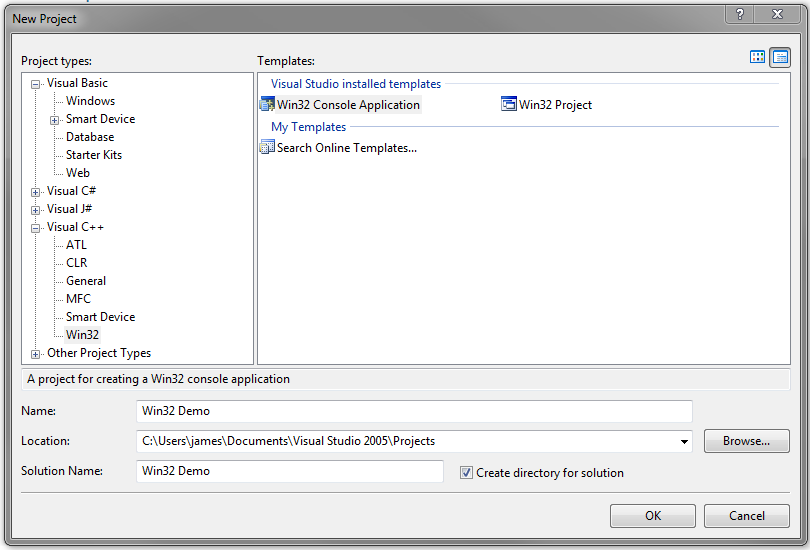
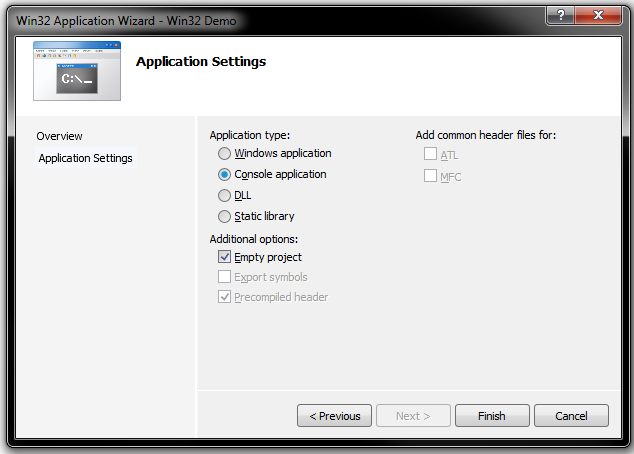
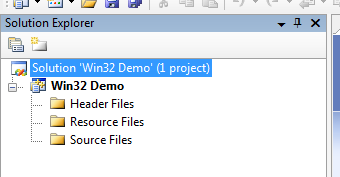
In the above case, the Solution represents the combination of programs and related resources intended to solve a problem. For basic C++ applications, choose an empty project:
To add project files, right-click on the Solution Explorer as appropriate.
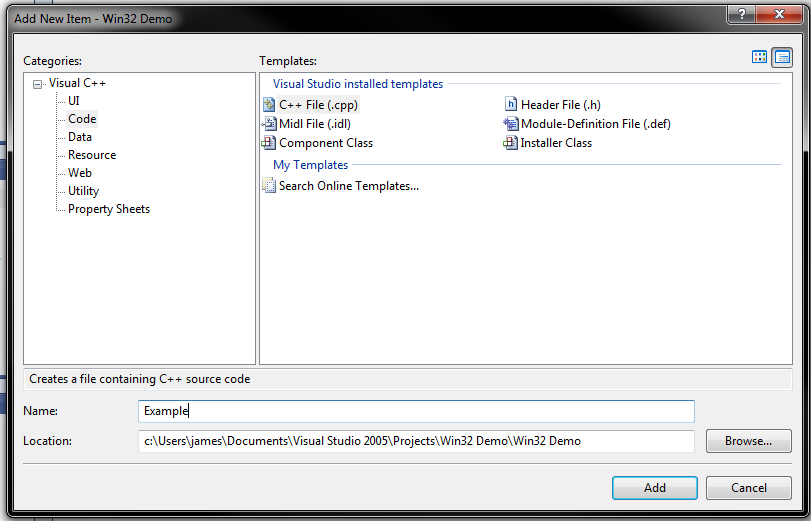
Add a C++ source file:
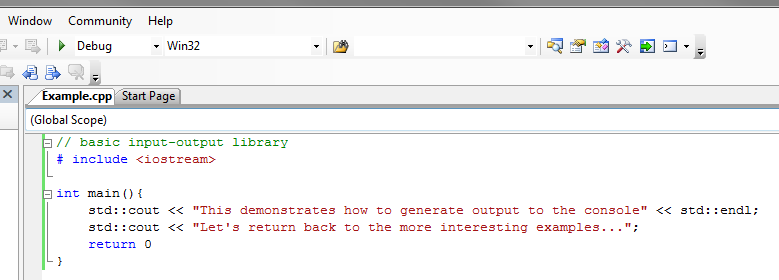
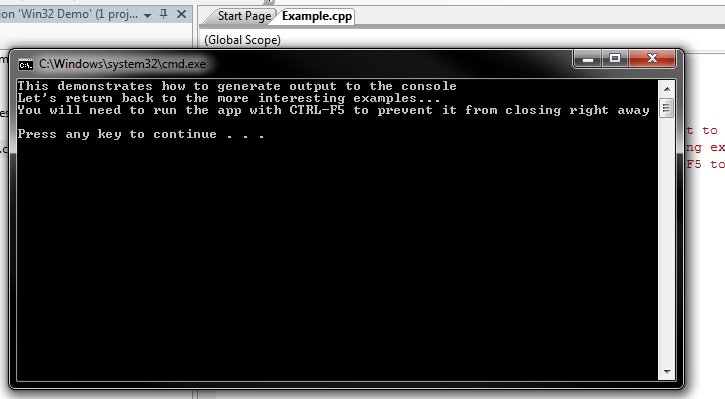
Generally, one builds a debug version of the application (to allow for debugging and tracing) and, later, a release version of the application that is more optimal. Clicking the green arrow will build the application, open and (in this case) close the app. To prevent the app from closing right away, enter CTRL+F5 instead.
Debug build file types
Debug build files are saved to the solution folder’s debug subfolder. The file types present are dependent on the project type chosen.
Some examples:
| File extension | Description |
|---|---|
| .obj | Object files produced by the compiler. |
| .ilk | Incremental linker files. The linker combines object files and modules from other libraries to build the executable. To speed up the process, MVS saves a copy of previous builds (linked) and adds new modules if a change to the source code requires it. |
| .pch | Pre-compiled header files. These files contain represent compiled code that is not subject to modification (e.g. C++ libraries) and, when utilised, speed up build times. |
| .pdb | Program Debug Database files. Contains dubugging info used when running the app in debug mode. |
| .idb | Intermediate Debug files. Stores compiler states when building and speed up rebuilds. |
An exectuable is only generated when compilation and linking have succeeded.
CLR applications
The above Win32 project is intended for native applications (i.e. written using ISO/ANSI C++, compiled to native machine code, designed to run on the same architecture as the build machine). MVS provides such projects access to the Windows API and MFC (Microsoft Foundation Classes). MFC is an intermediate library that would sit between the application and the operating system.
MVS also provides tools to build CLR (Common Language Runtime) applications, which strictly speaking are Microsoft’s implementation of the CLI (Common Language Infrastructure) specification. CLR programs are designed to run on a virtual machine (defined by the CLI). Other languages, including Visual Basic and C# also support CLR development. The CLI defines a standard intermediate language that the virtual machine understands and is therefore what higher-level languages (Visual Basic, C# and C++ to name a few) target.
CLR applications written in C++ are also known as C++/CLI applications. However they are referred to, CLR applications are not native applications. They run on a virtual machine, much like what Java is to the Java Virtual Machine. C++/CLI applications effectively run C++ code in managed C++. This means that data and code is managed by the CLR, and includes features not normally available to native applications, including garbage collection.
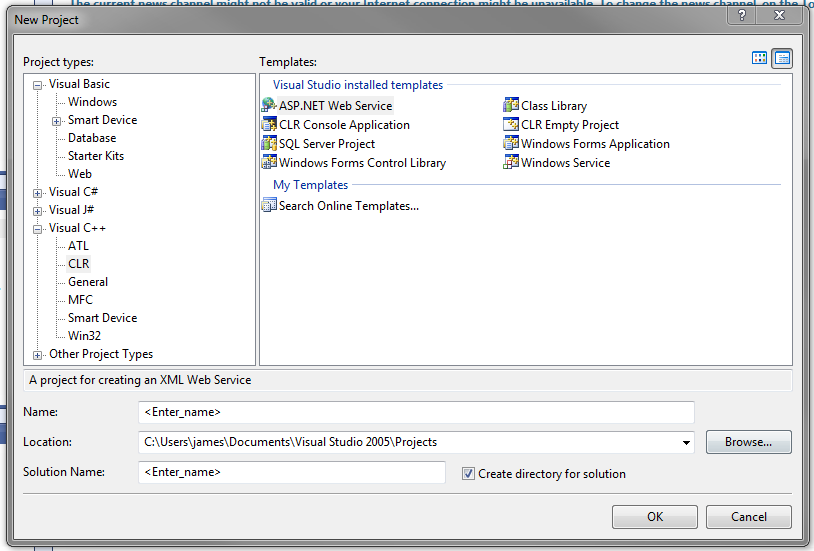
CLR and MFC projects in C++ can be accessed from the project types, as shown previously.
.NET applications
The .NET framework is a part of the operating system that makes it easier to build desktop and web applications. It implements the CLI and therefore provides greater collaboration with other programming languages that support it.
Both CLR and .NET applications come with very minor performance penalties due to the added features.
Multifile projects
This outlines how to build and manage header and source files with MVS. The following project is on GitHub here.
Class view
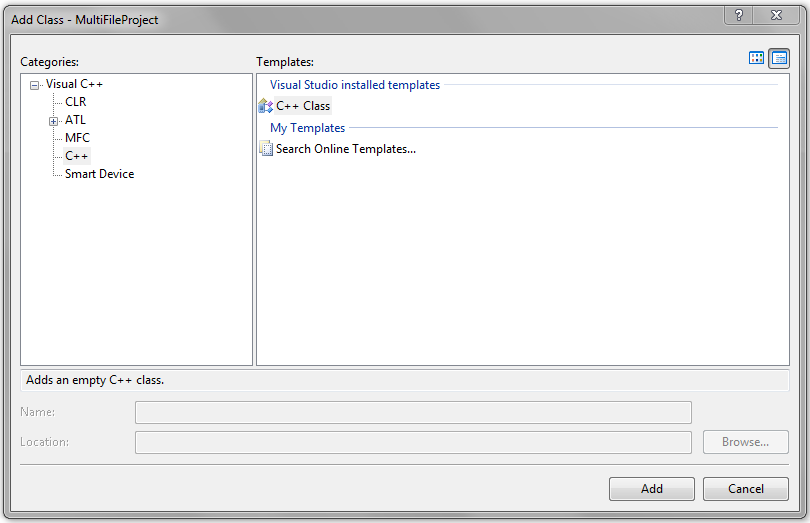
New (for example) Win32 console applications do not have classes by default, as shown by MVS Class viewer. To create a class from the viewer, right-click the solution and select Add, then Class.... Select C++ Class:
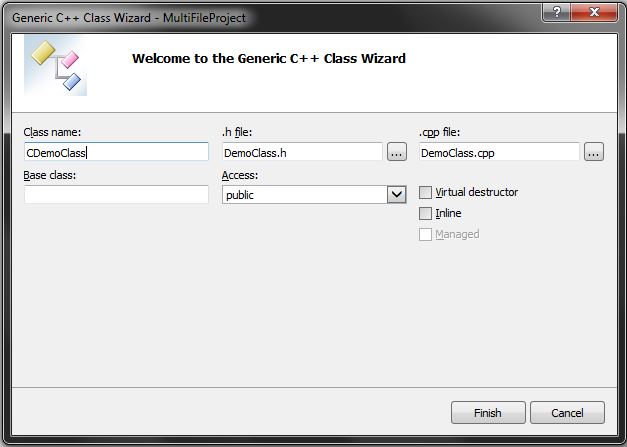
Enter the details (convention applied here precedes the class name with a C; MVS then autofills the filenames):
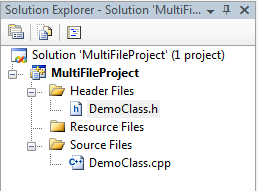
From the Solution Explorer, one can then see both header and source files created:
The preprocessor directive #pragma once is a Microsoft-specific directive, preventing the compiler from including the current header file more than once in the source code. This is done since multiple header files can include other header files which also have the same class definitions. This is not allowed and would cause an compile-time error.
An ISO/ANSI C++ equivalent to #pragma once is as follows:
#ifndef CUSTOM_CLASS_DEF
#define CUSTOM_CLASS_DEF
class CDemoClass
{
public:
	CDemoClass(void);
	~CDemoClass(void);
};
#endif
The directive #ifndef can be read as if-not-defined i.e. if “CUSTOM_CLASS_DEF” is not defined elsewhere/previously then proceed with the following i.e. #define. The directive #endif closes the if block.
To add data members from the Class view, right-click the class and select Add then Add variable. The option to add member functions can also be seen from the same list.
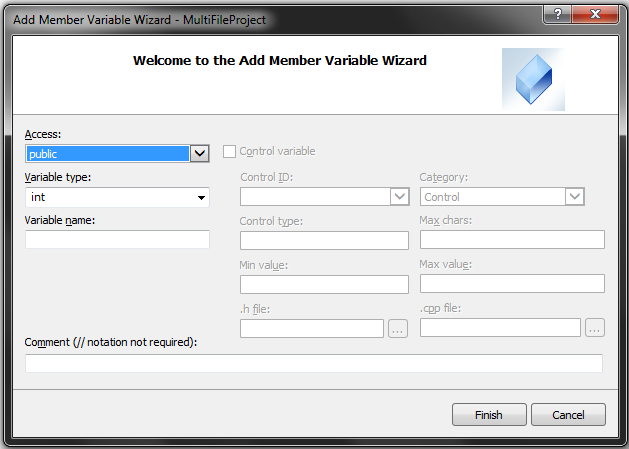
The constructor, destructor, data and function members will be listed in the Class view:
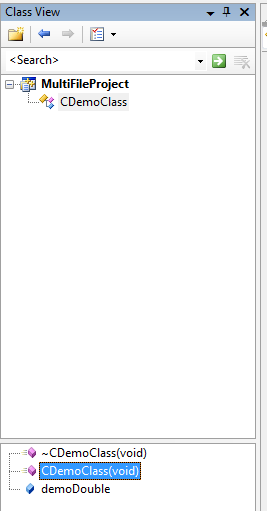
Changes applied (saved) to the header or source files will cause the Class view to update.
To add global functions (i.e. operations on DemoClass objects that do not require access to private members), from the Solution Explorer, right-click Source Files and add a C++ source file. Then from this file, include the header file:
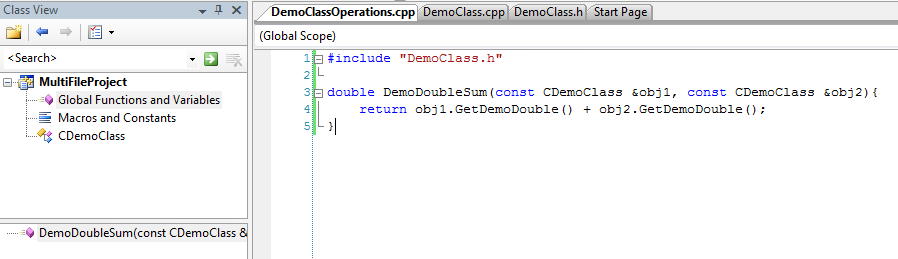
The global functions will then be listed as shown above.
The corresponding header file for the source file of global functions can be added similarly from the Solution Explorer, making the global functions available elsewhere in the project.
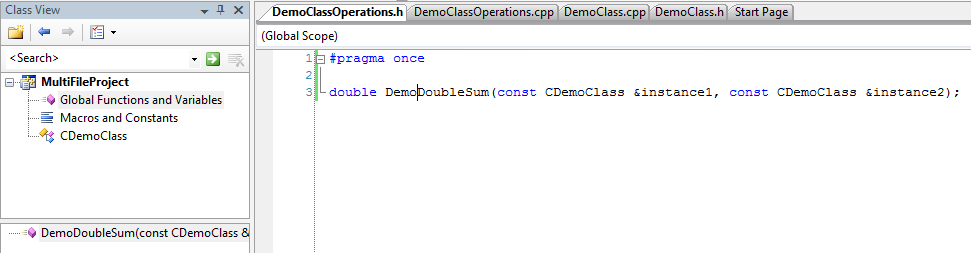
Right-clicking the function name will provide a dropdown to access the function definition.
Highlighting an in-built function with the cursor and entering F1 open the help documentation to the selected function.
Dynamic link libraries DLLs
DLLs are libraries linked to applications in one of two ways:
- early binding or load-time dynamic linking: the DLL is loaded shortly after the application that requires it is loaded
- late binding or runtime dynamic linking: the DLL is only loaded when the application (which may have been booted for some time) needs to access it
When a DLL is no longer required by any application, it is deleted from memory.
For the latter (late-binding) an application can ask to load the DLL (if it is not already loaded) prior to invocation with the Windows API function LoadLibrary(), before getting the address of the function in the DLL with GetProcAddress(). When the program no longer needs the DLL, it can call FreeLibrary() to detach itself from the DLL.
What’s available
DLLs not only contain code but also resources e.g. icons, fonts and images. Only specific functions identified by the exported keyword are visible to applications.
DLLs have the equivalent of an application main() function known as DllMain(). Windows calls this function to initialise the DLL and calls it again to cleanup prior to deletion.
Types of DLLs
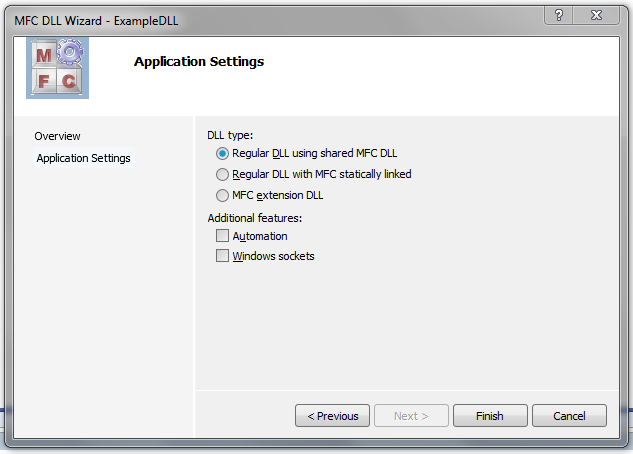
Specifically in regard to MFC applications, there are three types of DLLs:
- MFC extension DLL - a DLL that contains classes derived from (that extend) MFC classes, objects of said classes, or, defines functions with pointers to MFC instances. Such DLLs dynamically link to other MFC DLLs and so the working environment must have MFC installed. Programs that utilise MFC extension DLLs cannot be statically linked to MFC.
- Regular DLL dynamically linked to MFC - an option when a DLL does not extend MFC classes, but rather contains functions that require access to MFC classes and related. Programs that use such DLLs need not be MFC applications. MFC must be installed in the environment, since these types of DLLs do not contain MFC implementation.
- Regular DLL statically linked to MFC - these DLLs do not extend MFC classes but define functions that require access to MFC classes and related. Rather than referring to MFC through dynamic linking, these DLLs contain a copy of the MFC classes it needs through static linking. A bulkier option but with the advantage that MFC need not be installed. As above, programs that utilise such DLLs need not be MFC applications.
The choices can be instructed through MVS via the New Project wizard:
DLL file types
DLLs are built as both DLL files (for dependent program execution) and as LIB files (containing definitions of the items exported by the DLL required by the linker, during dependent program linking). The DLL file must either reside in the same directory as the program or reside in the \WINNT\System\ folder.
The program that depends on the DLL must refer to the items via a header file, which should be part of the project.
Without access to the source code, all three files (the DLL, the LIB and the header files) must be provided to other developers or development projects. For general, end-user distribution, only the program EXE and DLL are required.
Extension DLLs: exporting and importing classes, objects, functions and symbols
Classes (which must be visible outside the DLL) from which all required classes or those with public scoped methods must be annotated as follows:
class AFX_EXT_CLASS BaseClassInDLLToBeExported: public SomeMFCClass {

	// variables and methods...
}
Variables, methods and symbols (constants) that must be accessed (imported) by a program must be prefixed within the DLL code with
// two underscore characters
__delspec(dllexport) Type identifier = someValue;

__delspect(dllexport) returnType functionIdentifier(params);

__delspec(dllexport) extern const Type SOME_CONST_VALUE = someValue;
Quite often, it helps define a shorthand instead to simplify the code:
#define DllExport __delspec(dllexport)

// ...later e.g.

DllExport extern const Type SOME_CONST_VALUE = someValue;
The additional extern modifier overrides the default action of const which makes such variables not only constant but also have internal linkage, i.e. limited local scope. We want the symbol to be available externally, i.e. have global scope.
To access exported symbols from a DLL, define them in the program source code (usually a header file) as follows:
// again, following a convention to simplify the notation
#define DllImport __delspec(dllimport)

// the value is defined in the DLL, we only need to reference it here from the program
DllImport extern const Type IDENTIFIER_WITHOUT_ASSIGNMENT;
Classes, objects and functions defined within the program that access those from a DLL don’t require additional notation. The DLL header file must be declared in the cpp file that depends on them.
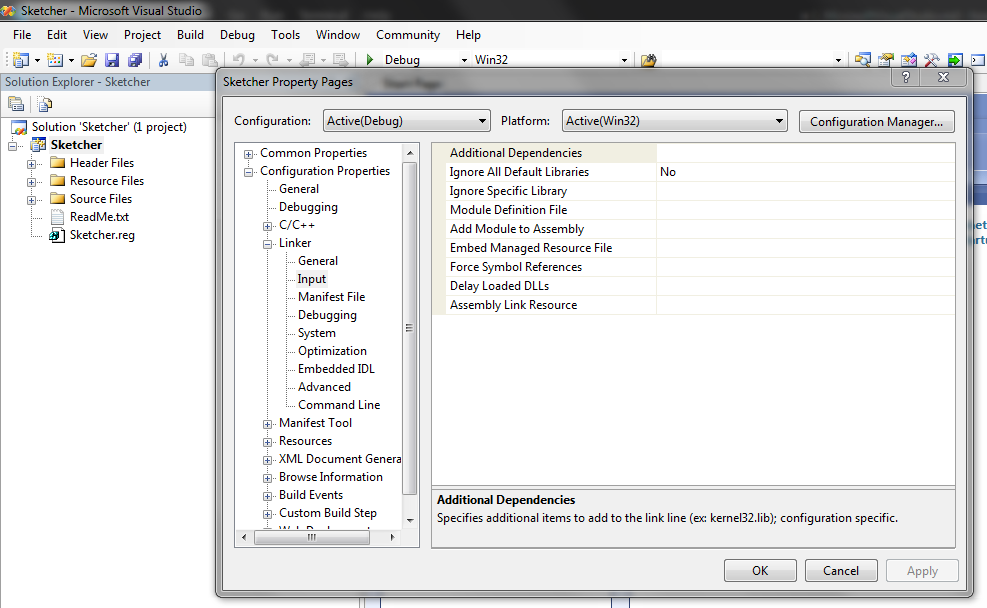
The DLL lib file is only used during linking (i.e. after comppilation) and therefore does not need to be referenced from code but made known to MVS from the project property page updating Additional Dependencies: