MFC Database applications
This article demonstrates the main aspects involved to building Windows database applications with MVS using MFC (Microsoft Foundation Classes).
Note: to ensure access to all of Microsoft SQL Server 2005’s functionality, it may be necessary to uninstall SQL Server 2005 installed with MVS 2005, and then install SQL Server 2005 (e.g. Developer edition) from scratch.
SQL Server 2005
Given the time at which SQL Sever 2005 was applied for MVS 2005, there are a few differences compared to more modern implementations of SQL. All SQL queries discussed here return recordsets.
SELECT * FROM tableName;

SELECT colA, colB FROM tableName;

-- the following are equivalent and required for column names with whitespace;
-- the latter preferred with C++ strings
SELECT "column A", "column B" FROM tableName;
SELECT [column A], [column B] FROM tableName;
The WHERE keyword is applied as follows:
SELECT * FROM tableName WHERE [Column C] = 1 AND [Column D] > 0.5;
There is no JOIN keyword with this level of SQL but join queries with specific fields can be performed as follows:
SELECT * FROM tableOne, tableTwo WHERE tableOne.[column A ID] = tableTwo.[column Z ID];
One can sort records by ordering:
SELECT * FROM tableOne WHERE colA.status = 'someString'
Database support
MVS 2005 supports
- OLE DB - an Object-Linking and Embedding database accessed via COM (ActiveX); can be hosted locally or remotely and is generally more optimal without the MFC overhead
- ODBC - an Open DataBase Connectivity implementation; a standard function orientated interface that support a number of database vendors inc. SQL Server 2005 through ODBC drivers
MFC supports ODBC primarily through the following classes:
- CDatabase - represents database connections
- CRecordset - represents the object returned from
SELECTqueries, supporting navigation through the set - CRecordView - represents the object (typically a dialog box) that displays the current information from the recordset instance
- CFieldExchange - provides functions that exchange data between the database and recordset object; tends to be used only if custom data types for fields are involved
- CDBException - handles exceptions that occur from ODBC operations
Registering an ODBC database
Before accessing an ODBC database, one must register such a database from Windows. From the Control Panel or Administrative Tools is the Data source (ODBC) option.
SQL Server 2005
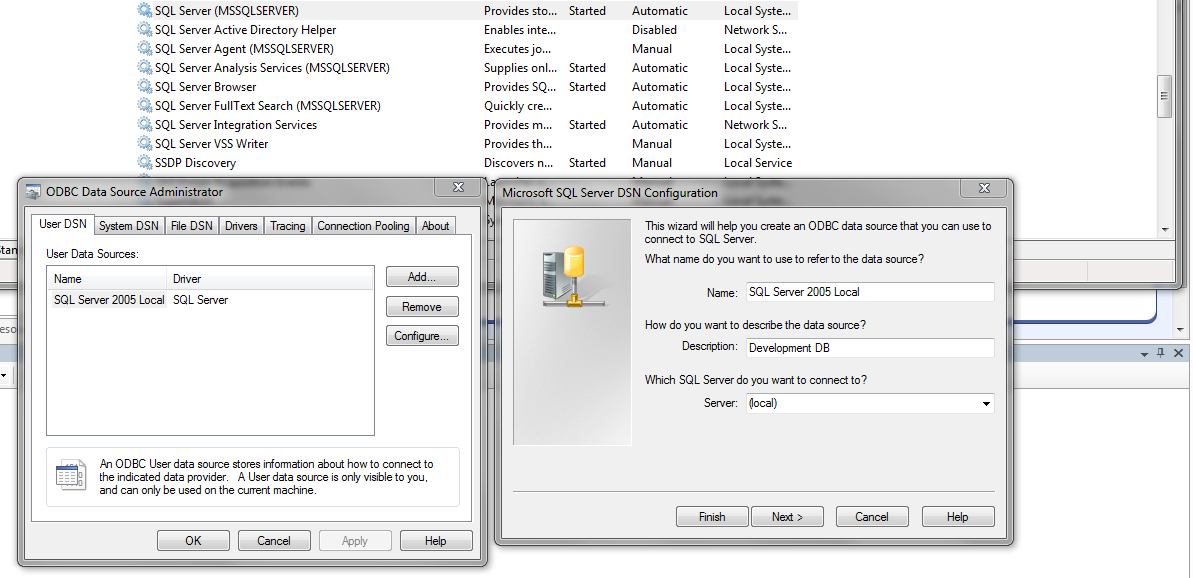
With SQL Server 2005 already installed, one can set up a local database as shown:
Microsoft Access
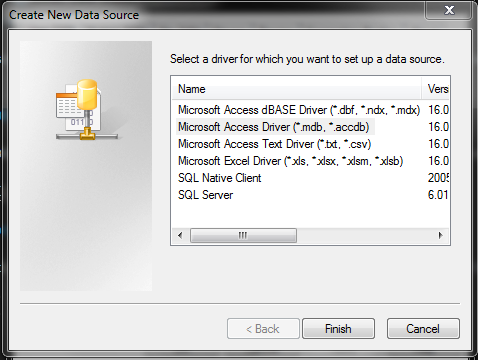
This requires a Microsoft Access Driver (*.mdb) file. If Microsoft Access is not already installed then download the Microsoft Access Database runtimes (2016 supports Windows 7).
Open the Data source (ODBC) option from the Windows Control Panel, then locate the MDB file to register the database.
Starting a new MVS project
Create a new MFC application via the wizard, choosing the SDI interface. Eventually when prompted, select Database view without file support and select ODBC as the client type:
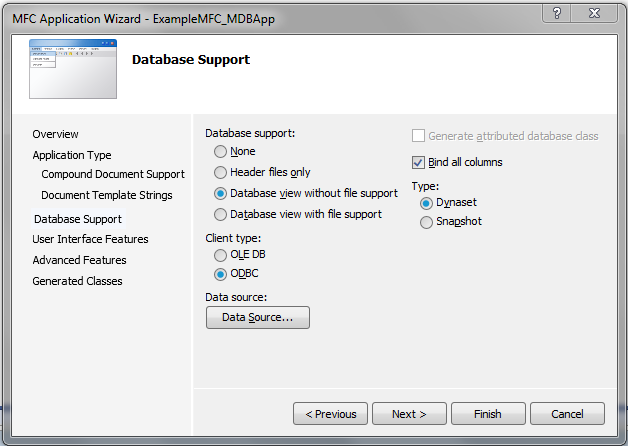
Click Datasource and set up a new data source (*.dsn). When prompted from the ODBC Microsoft Access Setup dialog, select the MDB file (again) by clicking Select (see the repo for a copy of the Northwind.mdb file).
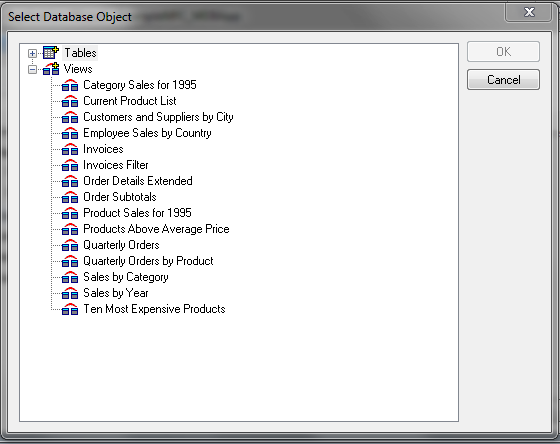
Then pick one or more database tables or views (hold CTRL and click):
The previous wizard dialog box gives the option of database support type:
- Dyanset - recordset is saved to memory and updated whenever moving (i.e. not automatic if not) from one record to another. This ensures changes to the data (from the current user or other users) is made known.
- Snapshot - recordset is saved to memory. Updates applied to the database by other users are not known since the update does not refresh the recordset in memory.
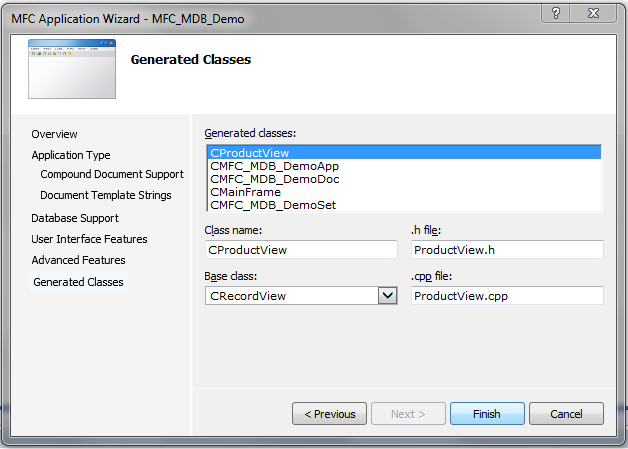
We select snapshot for the demo. Update the generated class names if desired (we chose the Product table from the MDB file so updated the record view class as shown):
Introducing the program structure
An MFC database application is composed of the same classes as a non-database application (e.g. Sketcher) with the addition of new classes.
The MFC database application draws on a new MFC class CRecordSet. This database class (in this project) defines the DB table fields (selected via the wizard) and is referred to by two key classes:
- A document class
CMFC_MDB_DemoDocwhich is derived from the MFC classCDocument. The class now introduces a new public member variableCMFC_MDB_DemoSetwhich is derived from the MFC classCRecordset. - The view class
CProductView(generated by the wizard for this project) is derived from the MFC class for recordsets,CRecordView. This class contains a public member pointer variable toCMFC_MDB_DemoSet.
The view DoDataExchange defines a member function DoDataExchange() which transfers data between CRecordSet data members and the dialog box controls that a user would interact with.
CRecordSet and CRecordView derivatives
Such derivatives for CRecordSet (amongst many things) manage database connections, via CDatabase objects. In this demo project, this is currently of the form:
CString CMFC_MDB_DemoSet::GetDefaultConnect()
{
	return _T(
        "DBQ=C:\\pathTo\\Northwind.MDB;
        DefaultDir=C:\\pathTo;
        Driver={Driver do Microsoft Access (*.mdb)};
        DriverId=25;
        FIL=MS Access;
        FILEDSN=C:\\pathTo\\MFC_MDB_Northwind_Demo.dsn;
        MaxBufferSize=2048;
        MaxScanRows=8;
        PageTimeout=5;
        SafeTransactions=0;
        Threads=3;
        UID=admin;
        UserCommitSync=Yes;");
}
The application will not normally compile if a string password is present. Instead a popup will show asking fro the user ID and password (if required).
The class also defines member variables for the selected tables’ fields, in this case:
	long	 m_ProductID; //Number automatically assigned to new product.
	CStringW m_ProductName;
	long	 m_SupplierID; //Same entry as in Suppliers table.
	long	 m_CategoryID; //Same entry as in Categories table.
	CStringW m_QuantityPerUnit; //(e.g., 24-count case, 1-liter bottle).
	double	 m_UnitPrice;
	int	 m_UnitsInStock;
	int	 m_UnitsOnOrder;
	int	 m_ReorderLevel; //Minimum units to maintain in stock.
	BOOL	 m_Discontinued; //Yes means item is no longer available.
The data type CStringW is used to enable support for Unicode strings (as opposed to ASCII) and may be required for international applications. For basic demos such as this, one can update this definition so the CString is used instead.
The following two functions are central to the application:
// default SQL query for Recordset
virtual CString GetDefaultSQL();

// transfers data from the database to the recordset, and back again
virtual void DoFieldExchange(CFieldExchange* pFX);
As mentioned above, CRecordset::DoFieldExchange() transfers data between the database and the recordset. The function CProductView::DoDataExchange() exchanges data between the recordset and the dialog box.
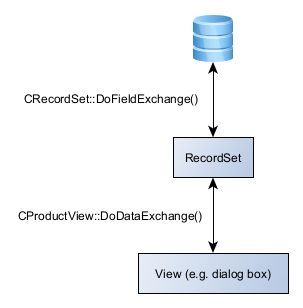
Most databases will have multiple tables, which in turn may require their own recordset representative. MFC database make it possible to have multiple recordsets and views in place. A recordset can be associated with more than one table.
The method GetDefaultSQL is used to populate the data members. The default implementation is:
CString CProductSet::GetDefaultSQL()
{
        return _T("[Products]");
}


// where required, the system generates the SQL query as follows:
// SELECT * FROM CProductSet::GetDefaultSQL()
As mentioned (for this project) a derivative of CRecordView, CProductView, serves to display information from the recordset (through CProductView::DoDataExchange()). The base class CRecordView provides much of the key functionality, the project derived class CProductView customises the functionality further.