DirectDraw (DirectX 7)
This article introduces the concepts behind DirectDraw (for DirectX 7) with the DirectX v9.0c SDK.
DirectDraw interfaces
There are four DirectDraw interfaces, all derived from IUnknown. The following interface identifiers omits any specific version number.
IDirectDraw- the main interface which effectively represents the GPUIDirectDrawSurface- represents the display surface that can reside in VRAM or system memory. Two types of surface:- Primary surface - represents the video buffer being rasterised and displayed on screen
- Seconday surface - represents the back buffer (off-screen) scene
IDirectDrawPalette- handles the 256-colour mode colour paletteIDirectDrawClipper- assists with clipping bitmap and raster operations, ensuring assets are set within the bounds of windowed applications and DirectDraw surfaces boundaries
1. Creating the DirectDraw object
There are principally three ways to create DirectDraw objects (based on IDirectDraw7):
- Use
DirectDrawCreate()to get an IDirectDraw 1.0 interfaceIDirectDraw, and then viaQueryInterface()get the latestIDirectDraw7interface - Use a low-level COM approach to get IDirectDraw7
- Use
DirectDrawCreateEx()to get hold of IDirectDraw7
Using DirectDrawCreate() to get IDirectDraw7
HRESULT WINAPI DirectDrawCreate(
    GUID FAR *lpGUID,
    LPDIRECTDRAW FAR *lplpDD,
    IUnknown FAR *pUnkOuter
);
DirectDrawCreate() has three parameters:
- lpGUID - GUID of the display driver to use; set to NULL to use the system default
- lplpDD - a pointer to a pointer that receives
IDirectDraw(recall,LPis a prefix to indicate that a pointer to the object of type given after the prefix is involved; hence,lplpDDis a pointer to a pointer to a DirectDraw interface) - pUnkOuter - advanced feature, leave as NULL
This section also introduces error handling, with macros SUCCCEEDED and FAILED (more modern C++ applications tend to avoid using macros and use regular functions instead). The following sections define functions that return HRESULT, as a return code. The only success code is DD_OK, so FAILED(DD_OK) returns false. There are several failure codes, including DDERR_DIRECTDRAWALREADYCREATED and DDERR_OUTOFMEMORY.
// standard DirectDraw 1.0
LPDIRECTDRAW lpdd = NULL;

// FAILED is a DirectX macro (contrast to SUCCEEDED)
if (FAILED(DirectDrawCreate(NULL, &lpdd, NULL))){
    // problem starting up 1.0, return
}

// got DirectDraw 1.0, let's update to 7.0
LPDIRECTDRAW lpdd7 = NULL;

if (FAILED(lpdd->QueryInterface(IID_DirectDraw7, (LPVOID *)&lpdd7))){
    // problem starting up 7.0; clean up then return
}

// release 1.0, don't need it anymore
lpdd->Release();
lpdd = NULL;
The IID_DirectDraw7 naming convention refers to the interface ID (IID) and also applies to other DirectX components e.g.
IID_DirectSoundXIID_DirectInputX
where X is the version number.
The COM approach to get IDirectDraw7
This approach requires knowledge of the interface ID (IID).
// try to load COM libraries
if (FAILED(CoInitialize(NULL))){
    // failed to load COM libraries, return
}

LPDIRECTDRAW lpdd7 = NULL;

if (FAILED(CoCreateInstance(&CLSID_DirectDraw, NULL, CLSCTX_ALL, &IID_IDirectDraw7, &lpdd7))){
    // failed to create DirectDraw 7 object, return
}

if (FAILED(IDirectDraw7_Initialize(lpdd7, NULL))){
    // failed to initialise DirectDraw 7.0 object, clean up and return
}

// could also use this instead to initialise
if (FAILED(lpdd7->Initialize(NULL))){
    // failed to initialise DirectDraw 7.0 object again, clean up and return
}

// finished with COM
CoUninitialize();
Using DirectDrawCreateEx() to get IDirectDraw7
This is a bit quicker to invoke, though still required knowing the interface ID of DirectDraw7 (IID_DirectDraw7).
LPDIRECTDRAW lpdd7 = NULL;

DirectDrawEx(NULL, (void **)&lpdd7, IID_DirectDraw7, NULL);
The function DirectDrawEx() has four parameters:
- lpGUID - the GUID of the driver, NULL for active display
- lplpDD - receiver of the interface
- iid - interface ID of the interface requested
- pUnkOther - advanced COM, leave as NULL
2. Setting the Cooperative level with Windows
The next step in building a DirectDraw application is consideration to how DirectX draws upon Windows resources. This is particularly applicable to windowed applications, where a DirectX application will not have nearly as much attention as a fullscreen application. Other applications may need to refresh their content and so temporarily the DirectX application must yield control to other applications from time to time.
Cooperative levels are determined by IDirectDraw7::SetCooperativeLevel().
HRESULT SetCooperativeLevel(
    HWND hWnd,
    DWORD dwFlags
);
The first parameter is normally the main window handle. The second parameter is the control flags parameter and it determines how DirectDraw cooperates with Windows, as bitwise OR flags.
// assume the DirectDraw interface pointer lpdd7 is initialised

// for windowed applications
lpdd7->SetCooperativeLevel(
    hWnd,
    DDSCL_NORMAL
);

// for fullscreen applications
lpdd7->SetCooperativeLevel(
    hWnd,
    DDSCL_FULLSCREEN |
    DDSCL_ALLOWMODEX | // allow Mode X (i.e. undocumented) display modes e.g. 320x200
    DDSCL_EXCLUSIVE | // exclusive level
    DDSCL_ALLOWREBOOT | // allow CTRL+ALT+DEL to be detected
);
See this DirectDrawDemo for an example of running a windowed Win32 DirectDraw7 application. Note that the ddraw LIB and header files had to be copied from the DirectX 9.0c SDK to the project folder prior to compilation.
The code is also reproduced below:
#define WIN32_LEAN_AND_MEAN

#define INITGUID

#include <windows.h>
#include <windowsx.h>
#include <mmsystem.h>
#include <iostream>
#include <conio.h>
#include <stdlib.h>
#include <malloc.h>
#include <memory.h>
#include <string.h>
#include <stdarg.h>
#include <stdio.h>
#include <math.h>
#include <io.h>
#include <fcntl.h>

// copied from the DirectX SDK to the parent directory of this project;
// also include DDRW.LIB from the DirectX SDK with this project
#include "ddraw.h"

#define WINDOW_CLASS_NAME "WINCLASS1"

// default screen size
#define SCREEN_WIDTH    640  // size of screen
#define SCREEN_HEIGHT   480
#define SCREEN_BPP      8    // bits per pixel
#define MAX_COLORS      256  // maximum colors

typedef unsigned short USHORT;
typedef unsigned short WORD;
typedef unsigned char  UCHAR;
typedef unsigned char  BYTE;

// MACROS /////////////////////////////////////////////////

#define KEYDOWN(vk_code) ((GetAsyncKeyState(vk_code) & 0x8000) ? 1 : 0)
#define KEYUP(vk_code)   ((GetAsyncKeyState(vk_code) & 0x8000) ? 0 : 1)

// initializes a direct draw struct
#define DD_INIT_STRUCT(ddstruct) { memset(&ddstruct, 0, sizeof(ddstruct)); ddstruct.dwSize = sizeof(ddstruct);}

HWND      main_window_handle = NULL; // globally track main window
HINSTANCE hinstance_app      = NULL; // globally track hinstance

// directdraw stuff

LPDIRECTDRAW7         lpdd         = NULL;   // dd object
LPDIRECTDRAWSURFACE7  lpddsprimary = NULL;   // dd primary surface
LPDIRECTDRAWSURFACE7  lpddsback    = NULL;   // dd back surface
LPDIRECTDRAWPALETTE   lpddpal      = NULL;   // a pointer to the created dd palette
LPDIRECTDRAWCLIPPER   lpddclipper  = NULL;   // dd clipper
PALETTEENTRY          palette[256];          // color palette
PALETTEENTRY          save_palette[256];     // used to save palettes
DDSURFACEDESC2        ddsd;                  // a direct draw surface description struct
DDBLTFX               ddbltfx;               // used to fill
DDSCAPS2              ddscaps;               // a direct draw surface capabilities struct
HRESULT               ddrval;                // result back from dd calls
DWORD                 start_clock_count = 0; // used for timing

// these defined the general clipping rectangle
int min_clip_x = 0,                          // clipping rectangle
    max_clip_x = SCREEN_WIDTH-1,
    min_clip_y = 0,
    max_clip_y = SCREEN_HEIGHT-1;

// these are overwritten globally by DD_Init()
int screen_width  = SCREEN_WIDTH,            // width of screen
    screen_height = SCREEN_HEIGHT,           // height of screen
    screen_bpp    = SCREEN_BPP;              // bits per pixel

char buffer[80];                     // general printing buffer


LRESULT CALLBACK WindowProc(HWND hwnd,
						    UINT msg,
                            WPARAM wparam,
                            LPARAM lparam){
	// this is the main message handler of the system
	PAINTSTRUCT		ps;		// used in WM_PAINT
	HDC				hdc;	// handle to a device context

	// what is the message
	switch(msg)
		{
		case WM_CREATE:
			{
			// do initialization stuff here
			// return success
			return(0);
			} break;

		case WM_PAINT:
			{
			// simply validate the window
   			hdc = BeginPaint(hwnd, &ps);

			// end painting
			EndPaint(hwnd, &ps);

			// return success
			return(0);
   			} break;

		case WM_DESTROY:
			{

			// kill the application, this sends a WM_QUIT message
			PostQuitMessage(0);

			// return success
			return(0);
			} break;

		default:break;

		}

	// process any messages that we didn't take care of
	return (DefWindowProc(hwnd, msg, wparam, lparam));
}

int Game_Main(void *parms = NULL, int num_parms = 0){
	// for now test if user is hitting ESC and send WM_CLOSE
	if (KEYDOWN(VK_ESCAPE))
	   SendMessage(main_window_handle,WM_CLOSE,0,0);

	// return success or failure or your own return code here
	return(1);
}


int Game_Init(void *parms = NULL, int num_parms = 0){
	// this is called once after the initial window is created and
	// before the main event loop is entered, do all your initialization
	// here

	// create IDirectDraw interface 7.0 object and test for error
	if (FAILED(DirectDrawCreateEx(NULL, (void **)&lpdd, IID_IDirectDraw7, NULL)))
	   return(0);

	// set cooperation to normal since this will be a windowed app
	lpdd->SetCooperativeLevel(
		main_window_handle,
		DDSCL_NORMAL);

	// return success or failure or your own return code here
	return(1);
}

int Game_Shutdown(void *parms = NULL, int num_parms = 0){
	// this is called after the game is exited and the main event
	// loop while is exited, do all you cleanup and shutdown here

	// simply blow away the IDirectDraw7 interface
	if (lpdd){
	   lpdd->Release();
	   lpdd = NULL;
	}

	// return success or failure or your own return code here
	return(1);
}

int WINAPI WinMain(	HINSTANCE hinstance,
					HINSTANCE hprevinstance,
					LPSTR lpcmdline,
					int ncmdshow){

	WNDCLASSEX winclass; // this will hold the class we create
	HWND	   hwnd;	 // generic window handle
	MSG		   msg;		 // generic message

	// first fill in the window class stucture
	winclass.cbSize         = sizeof(WNDCLASSEX);
	winclass.style			= CS_DBLCLKS | CS_OWNDC |
							  CS_HREDRAW | CS_VREDRAW;
	winclass.lpfnWndProc	= WindowProc;
	winclass.cbClsExtra		= 0;
	winclass.cbWndExtra		= 0;
	winclass.hInstance		= hinstance;
	winclass.hIcon			= LoadIcon(NULL, IDI_APPLICATION);
	winclass.hCursor		= LoadCursor(NULL, IDC_ARROW);
	winclass.hbrBackground	= (HBRUSH)GetStockObject(BLACK_BRUSH);
	winclass.lpszMenuName	= NULL;
	winclass.lpszClassName	= WINDOW_CLASS_NAME;
	winclass.hIconSm        = LoadIcon(NULL, IDI_APPLICATION);

	// save hinstance in global
	hinstance_app = hinstance;

	// register the window class
	if (!RegisterClassEx(&winclass))
		return(0);

	// create the window
	if (!(hwnd = CreateWindowEx(
        NULL,                  // extended style
        WINDOW_CLASS_NAME,     // class
        "DirectDraw Initialisation Demo", // title
        WS_OVERLAPPEDWINDOW | WS_VISIBLE,
        0,0,	  // initial x,y
        400,300,  // initial width, height
        NULL,	  // handle to parent
        NULL,	  // handle to menu
        hinstance,// instance of this application
        NULL)))	// extra creation parms
	{
		return(0);
	}

	// save main window handle
	main_window_handle = hwnd;

	// initialize game here
	Game_Init();

	// enter main event loop
	while(TRUE){
		// test if there is a message in queue, if so get it
		if (PeekMessage(&msg,NULL,0,0,PM_REMOVE)){
		   // test if this is a quit
		   if (msg.message == WM_QUIT)
			   break;

		   // translate any accelerator keys
		   TranslateMessage(&msg);

		   // send the message to the window proc
		   DispatchMessage(&msg);
		}

	   // main game processing goes here
	   Game_Main();
	}

	// closedown game here
	Game_Shutdown();

	// return to Windows like this
	return(msg.wParam);
}
3. Setting the display mode
The next step is setting the display mode, with IDirectDraw7::SetDisplayMode().
HRESULT SetDisplayMode(
    DWORD dwWidth,
    DWORD dwHeight,
    DWORD dwBPP,
    DWORD dwRefreshRate,
    DWORD dwFlags
);
The parameters are:
- dwWidth - width of display mode in pixels
- dwHeight - height of display mode in pixels
- dwBPP - bit-depth or colour depth (per pixel) e.g. 8-bit, 16-bit, 24-bit…
- dwRefreshRate - refresh rate; 0 is default
- dwFlags - advanced use; 0 for defaults
For example, the following sets the display mode to 800x600 with a 16-bit colour depth:
lpdd7->SetDisplayMode(800, 600, 16, 0, 0);
Setting the colour depth to 8-bit (256 colour) will require a palette to be defined for mappings. Recall that this means there are 256 values for each of the red, green and blue channels. Thus this requires a data type that stores three 8-bit wide channels i.e. a 24-bit wide data type.
Higher level 16-bit, 24-bit and 32-bit colour modes do not require a palette and instead use encoded data sent straight to the video buffer (discussed later).
a. Setting up an 8-bit palette
In applications targetting 8-bit colour, a palette would need to be defined.
This normally involves defining palette data structure as an array of 256 PALETTENTRY:
PALETTENTRY palette[256];

for (int colour = 1; colour < 255; coloir++){
    palette[colour].peRed = rand() % 256;
    palette[colour].peGreen = rand() % 256;
    palette[colour].peBlue = rand() % 256;

    // this is needed to prevent Windows or DirectX
    // automatically optimising the palette
    palette[colour].peFlags = PC_NOCOLLAPSE;
}

// set black colours (0, 0, 0) - somewhat optional, see remarks on control flags later
palette[0].peRed = 0;
palette[0].peGreen = 0;
palette[0].peBlue = 0;
palette[0].peFlags = PC_NOCOLLAPSE;

// set white colours (255, 255, 255) - somewhat optional, see remarks on control flags later
palette[255].peRed = 255;
palette[255].peGreen = 255;
palette[255].peBlue = 255;
palette[255].peFlags = PC_NOCOLLAPSE;
With the above palette set up, one then assigns this to IDirectDrawPalette interface using IDirectDraw7::CreatePalette().
HRESULT CreatePalette(
    DWORD dwFlags, // control flags
    LPPALETTEENTRY lpColourTable, // palette data or NULL
    LPDIRECTDRAWPALETTE FAR *lplpDDPalette, // palette interface
    IUnknown FAR *pUnkOuter // advanced usage; leave as NULL
);
The first parameter is probably of most concern here, and is composed of one or more control flags, with bitwise OR operations if needed. Some commonly used flags:
DDCAPS_8BIT- Represents 8-bit colour, with 256 colour table entriesDDCAPS_ALLOW256- applies if all 256 entries have been defined by the palette, including0for black and255for white. Some systems (e.g. Windows NT) do not allow these to be set and assume black and white values are already0and255respectively. To let the OS handle black and white, exclude these “colours” from the palette (see above) and then omit this flag.DDCAPS_INITIALIZE- initialise the colours based on the array passed toCreatePalette(); this is needed for 8-bit colour
With the above 8-bit palette initialised, one can assign it:
// palette array is "palette", above, where black and
// white are defined

// the palette interface received
LPDIRECTDRAWPALETTE lpddpal = NULL;

if (FAILED(lpdd7->CreatePalette(
    DDCAPS_8BIT | DDCAPS_INITIALIZE,
    palette,
    &lpddpal,
    NULL
))){
    // problem setting up the display palette, clean up and exit
}

// OK, lpddpal is no longer NULL and has a valid IDirectDrawPalette interface, palette ready...
b. Building a Display Surface
A display surface is a DirectDraw abstraction of memory that defines a rectangular region that holds bitmap data. For completeness, a bitmap (or pixmap or raster) is an image defined by an array of pixels. Raster graphics define each pixel via an array and have a defined resolution, unlike vector graphics which are defined by mathematical formulae and are not characterised by a finite resolution.
As mentioned previously, there are two types of surface:
- Primary surface - video memory currently being rasterised (converted to a raster) to the screen by the video card. There is usually only one primary surface in a given DirectDraw application.
- Secondary surface - this can be either the abstraction of video memory or system memory, which is prepared offscreen prior to the next frame. The secondary surface is a buffer that is eventually page-flipped (copied) to the primary surface. There is usually more than one secondary surface present per application. For example, applications that have one secondary surface would support double buffering, and two secondary surface applications supporting triple buffering.
To build a display surface, one must first define a DDSURFACEDESC2 structure that describes the surface, before calling IDirectDraw7::CreateSurface() to create it.
typedef struct _DDSURFACEDESC2 {
  DWORD      dwSize;
  DWORD      dwFlags;
  DWORD      dwHeight;
  DWORD      dwWidth;

  union {
    LONG  lPitch;
    DWORD dwLinearSize;
  } DUMMYUNIONNAMEN(1);

  DWORD dwBackBufferCount;

  union {
    DWORD dwMipMapCount;
    DWORD dwRefreshRate;
  } DUMMYUNIONNAMEN(2);

  DWORD      dwAlphaBitDepth;
  DWORD      dwReserved;
  LPVOID     lpSurface;
  DDCOLORKEY ddckCKDestOverlay;

  DDCOLORKEY ddckCKDestBlt;
  DDCOLORKEY ddckCKSrcOverlay;
  DDCOLORKEY ddckCKSrcBlt;

  DDPIXELFORMAT ddpfPixelFormat;
  DDSCAPS2   ddsCaps;
  DWORD      dwTextureStage;
} FAR *LPDDSURFACEDESC2, DDSURFACEDESC2;
An overview/reminder of C++ unions is given here. As given, _DDSURFACEDESC2 is a struct with unions as fields.
The following summarises the principal fields that are commonly used (see the official docs for more details for all fields).
- dwSize - specifies the size in bytes of this DDSURFACEDESC2 structure and must be initialised before the structure is used
- dwFlags - identifies which
_DDSURFACEDESC2fields (represented by flags) are provided with valid data or_DDSURFACEDESC2fields which are required during a query. For example, the fieldddsCapshas the flagDDSD_CAPS - dwWidth - indicates the width of the surface in pixels
- dwHeight - indicates the height of the surface in pixels
- lPitch - The memory pitch, also known as the stride or memory width, this represents the number of bytes per (2D) memory row. In VRAM, a row of pixels is stored in a memory row, which has a width known as memory pitch. The memory pitch is always greater than or equal to the surface’s horizontal resolution. When the pitch is greater, it means that some portion of the memory row is used for something other than the surface, e.g. cache (see below). In order for the application to consistently find the pixel definition within the memory row, it is necessary to know what the memory pitch is. One accesses a pixel on the nth position of a row (from the left) that is m-columns down (memory is addressed top to bottom, left to right) is given by
n + (m*lPitch).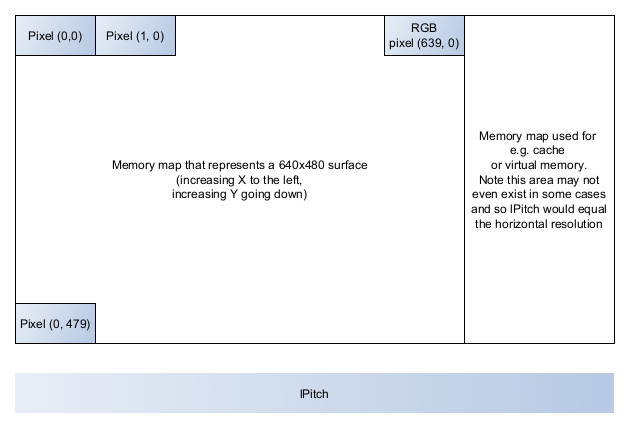
- lpSurface - used to retrieve a pointer to the surface, whether in video memory or system memory.
- dwBackBufferCount - used to set or read the number of back buffers (secondary offscreen flipping buffers) chained to the primary surface. One back buffer is called double buffering while two back buffers is called triple buffering.
- ddckCKDestBlt - used to control the destination colour key used in blitting operations (the transfer of a rectangular block of pixels)
- ddckCKSrcBlt - indicates the source colour key, i.e. the colours that shouldn’t be blitted. Used to set transparency colours.
- ddpfPixelFormat - used to retrieve the pixel format of a surface, with
_DDPIXELFORMATstructure (itself quite an extensive structure) - ddsCaps - indicates the requested properties (capabilities) of the surface that are currently undefined which require initialisation at some point. Surface capabilities include back buffering, whether a surface uses video memory instead of system memory, whether a surface is an offscreen surface with minimal characteristics (e.g. no overlays, texturing or alpha surfacing).
As an example of setting display surface:
// assume the DirectDraw interface pointer lpdd7 has been initialised

// pointer to the surface interface
LPDIRECTDRAWSURFACE7 lpddsprimary = NULL;

// the surface description
DDSURFACEDESC2 ddsd;

// a general recommendation to clear (really fill with zeros) and prep ddsd
// with memset()
memset(&ddsd, 0, sizeof(ddsd));

// start initialising the structure's fields
ddsd.dwSize = sizeof(ddsd);

// decide which valid fields will be provided or required
// in this case the surface properties field ddsCaps
ddsd.dwFlags = DDSD_CAPS;

// now set the capabilities of the chosen field(s)
// ddsCaps is itself a structure, of which dwCaps is
// a commonly used field
ddsd.ddsCaps.dwCaps = DDSCAPS_PRIMARYSURFACE;

// now create the primary surface, and initialise lpddsprimary
if (FAILED(lpdd7->CreateSurface(&ddsd, &lpddsprimary, NULL))){
    // failed to build the primary surface, clean up and exit
}

// okay, good to go...
c. Attaching the palette to the surface
With both the palette and surface ready, one can invoke IDirectDrawSurface7::SetPalette():
HRESULT SetPalette(LPDIRECTDRAWPALETTE, lpDDPalette);
The function can be called as shown:
// ...resuming from the palette lpddpal and surface lpddsprimary
if (FAILED(lpddsprimary->SetPalette(lpddpal))){
    // error attaching palette to surface, clean up and exit...
}

// palette attached OK...
How pixels are plotted
As mentioned previously, video memory abstracts a surface by mapping a location on the surface to a specific area in memory. The surface origin is positioned at the top-left, and in terms of memory location is also represented by the top-left memory location. Each row (left to right, top to bottom) then falls somewhere below and to the right of the origin.
Video memory is not always uniformly distributed, so simply assuming one can plot a pixel by memory, at the mth row and nth point along the row cannot be applied. For such cases, DirectX provides another abstraction, the memory pitch (per line) which determines number of bytes between each row. Then determining the pixel position for the mth row (x) at the nth position (to the right, y) is given by:
// 8-bit integer
UCHAR *videoBuffer8bit;

// somePixelColour8 is UCHAR
videoBuffer8bit[x + (y*memoryPitch8bit)] = somePixelColour6;
8-bits is one byte, so each pixel in 8-bit mode requires one byte. For 16-bit mode, an adjustment is needed:
// 16-bit integer
USHORT *videoBuffer16bit;

// somePixelColour16 is USHORT
videoBuffer16bit[x + (y* (memoryPitch8bit >> 1))] = somePixelColour16;
In the case of the pointer videoBuffer16bit (or array), videoBuffer16bit[1] represents the second 16-bit element, equivalent to the combination of the elements at videoBuffer8bit[2] and videoBuffer8bit[3].
The >> shift operation is equivalent to dividing the 8-bit memory pitch in half, to yield a 16-bit memory pitch.
As already mentioned, the somePixelColour16 pixel is given by an encoded RGB format, whereas somePixelColour6 is an 8-bit value colour index. 16-bit RGB formats include R5G6B5, i.e. 5-bits for red and blue, with 6-bits for green.
Locking memory, plotting pixels and unlocking memory
In order to manage surfaces clearly, it is first necessary to lock an area of memory in order to prevent other Windows processes from accessing or modifying it.
HRESULT Lock(
	LPRECT lpDestRect,
	LPDDSURFACEDESC2 lpDDSurfaceDesc,
	DWORD dwFlags,
	HANDLE hEvent
);
The first parameter of type LPRECT represents a rectangular proportion of or entirety of the surface to be locked. Passing NULL here will assume the entire surface should be locked. The rectangle origin is the same as the surface origin. An LPRECT instance has both memory pitch (lPitch) and pointer to surface (lpSurface) properties: these are accessed shortly when plotting pixels.
The second parameter, as explained above, of type LPDDSURFACEDESC2 defines the surface characteristics required.
The third parameter represent control flags in relation to the lock, e.g.:
- DDLOCK_READONLY - locked surface will be read-only
- DDLOCK_SURFACEMEMORYPTR - a valid memory pointer to the top-left corner of the rectangle (type
LPRECT) must be returned (seeddsdin the code snippet below) - DDLOCK_WAIT - retry attempts to obtain a lock automatically if previous attempts fail or an error occurs
- DDLOCK_WRITEONLY - locked surface will be write-enabled
The fourth parameter is for advanced use cases, and not covered here.
Plotting pixels can be handled by custom functions (not part of DirectX) Plot8() and Plot16(), for 8-bit and 16-bit modes respectively. As shown, these functions encapsulate the video buffer and memory pitch assignments.
inline void Plot8(
	int x,
	int y,
	UCHAR color, // colour index for 8-bit mode
	UCHAR *buffer, // pointer to surface memory
	int memPitch){
		videoBuffer8bit[x + (y*memPitch)] = color;
}
An example showing Plot8() is given below. For comparison, Plot16() has a implementation and usage as follows:
inline void Plot16(
	int x,
	int y,
	UCHAR red,
	UCHAR green,
	UCHAR blue,
	USHORT *buffer,
	int memPitch){
		// use R5G6B5 format
		videoBuffer16bit[x + (y* (memPitch >> 1))] = __RGB16BIT565(red, green, blue);
}

// then plot under a 16-bit encoded format
Plot16(
	300,
	100,
	10, 14, 30, // RGB
	(USHORT*) ddsd.lpSurface,
	(int) ddsd.lPitch
);
The following shows how to lock the surface, plot pixels (with Plot8()) before unlocking the surface.
// our valid memory pointer to the rectangle
DDSURFACEDESC2 ddsd;

// flood zeros, and prep the surface description
memset(&ddsd, 0, sizeof(ddsd));

ddsd.dwSize = sizeif(ddsd);

if (FAILED(lpddsprimary->Lock(
	NULL,
	&ddsd,
	DDLOCK_SURFACEMEMORYPTR | DDLOCK_WAIT,
	NULL))){
		// error locking the surface, exit...
}

// now plot pixels on the locked surface with custom Plot8(),
// passing the aforementioned lpSurface and lPitch ddsd props
Plot8(
	100,
	20,
	26, // colour index
	(UCHAR*) ddsd.lpSurface,
	(int) ddsd.lPitch
);

// done plotting, now unlock the entire surface by
// passing NULL
if (FAILED(lpddsprimary->Unlock(NULL))){
	// error unlocking the surface, clean up and exit..
}

// surface unlocked
A full demo showing the steps to start up and draw on a DirectDraw surface is located here. Features shown include:
- DirectDraw7 COM object setup
- Cooperative level setup with Windows
- Display mode setup
- Palette setup
- Surface setup
- Attaching the palette to the surface
- Plotting points to the surface
- Locking the video buffer
- Plotting pixels by filling the video buffer array (via blitting or bit block transfer)
- Unlocking the video buffer
- Releasing resources on shutdown